

Table of Contents
- Why Advanced Perimeter Security for Schools Is Non-Negotiable in 2026
- School Perimeter Security Systems: Barriers, Fencing, and Secure Gates
- K-12 School Security Practices: Access Control, Visitor Management, and Daily Operations
- Perimeter Intrusion Detection for Schools: Sensors, AI, and Real-Time Alerts
- School Security Assessment Checklist: A Step-by-Step Risk Evaluation
- Emergency Response and System Integration Workflows
- Procurement, Lifecycle Costs, and Maintenance for School Perimeter Security
- Conclusion: Building a Resilient Perimeter Security Strategy
- Frequently Asked Questions
Last Updated: October 6, 2026
Why Advanced Perimeter Security for Schools Is Non-Negotiable in 2026
Advanced perimeter security for schools layers physical barriers, access control, detection technology, and response procedures to keep threats outside the building. The first minutes of an incident decide the outcome, and the perimeter is where those minutes are won or lost.
Districts that once treated a fence and a front-desk buzzer as sufficient now face a harder question: how do you detect a person, vehicle, or weapon approaching a campus before they reach a door? At MDI AI Detection, we work with security integrators and facility teams who ask that daily.
Below, we break down the components of a layered perimeter, walk through a step-by-step risk assessment, and show how detection, access control, and emergency response fit together.
School Perimeter Security Systems: Barriers, Fencing, and Secure Gates
School perimeter security systems combine physical barriers, fencing, secure gates, and entry-point controls into layers that slow an intruder while giving staff time to respond.
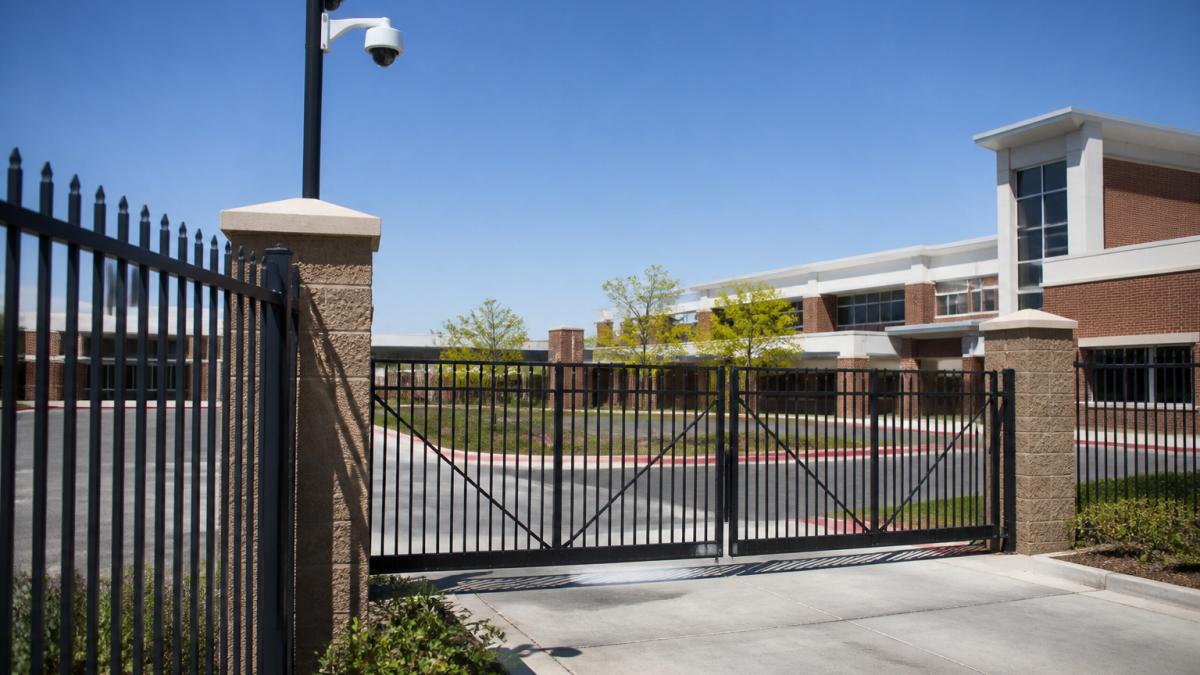
Start with the outer ring. Fencing establishes a clear property line and channels foot traffic toward monitored entry points, while anti-climb and anti-cut designs raise the effort required to get through.
Secure gates with controlled vehicle access let staff admit buses, deliveries, and parents without leaving the entrance unmanaged. Where traffic is heavy, a separate visitor lane prevents congestion risk.
Layered Security: The Five Ds in Practice
Layered security for schools follows the Five Ds framework: deter, detect, delay, deny, and defend. Each layer assumes the one before it may fail.
- Deter: Visible fencing, signage, lighting, and cameras make the campus a harder target.
- Detect: Perimeter sensors and video surveillance identify an approach in progress.
- Delay: Barriers and locked vestibules slow movement toward occupied areas.
The Five Ds only work as a chain. A strong fence with no detection just moves the problem to the parking lot. Detection without a response plan produces alerts nobody acts on.
K-12 School Security Practices: Access Control, Visitor Management, and Daily Operations
K-12 school security practices succeed when access control and visitor management run as daily routines, not occasional drills. The systems matter less than consistent staff use.
A single controlled entry point is the most effective access control measure most schools can adopt.
Vehicle access deserves the same attention: bus loops, parent drop-off lanes, and staff parking each create distinct traffic problems, and mixing them invites safety gaps.
Balancing Welcoming Campuses with Restricted Access
The hardest trade-off in school security is that a campus which feels like a fortress damages the environment it protects. Restricted access works best when invisible to legitimate visitors: a vestibule guiding arrivals to a check-in window, a gate that opens automatically for a recognized bus, and clear signage keep the welcome intact while controlling entry.
Accessibility matters here too. Any barrier, gate, or entry sequence must comply with ADA accessibility standards so students and staff with mobility needs are not routed through a secondary, less monitored entrance.
Perimeter Intrusion Detection for Schools: Sensors, AI, and Real-Time Alerts
Perimeter intrusion detection for schools uses sensors, video analytics, and real-time alerts to identify an approach before it becomes an entry, the layer that buys response time.
The technology falls into a few practical categories:
- Perimeter sensors detect contact or movement along a fence line, including vibration and fiber-optic sensors that pick up climbing or cutting.
- Underground intrusion detection catches foot or vehicle traffic crossing a buried boundary where no fence exists.
- Environmental and gunshot detection add audio and atmospheric monitoring for threats that physical sensors miss.
That last point is where most districts leave value on the table. A camera that only records helps after an incident; analytics on the same camera can flag a person approaching a fence line at 2 a.m. and alert staff while there is still time to respond.
Integrating AI with Existing IP Cameras
AI detection can run on the IP cameras and recorders a school already owns.
MDI AI Detection takes this approach: on-site AI servers process video from existing IP cameras and recorders, with no cloud video streaming required.
For districts that need documented evidence, a court-ready audit trail with chain of custody turns an alert into something that holds up under scrutiny.
If staff receive unverified alerts, they stop checking. Tune sensitivity per camera and verify alerts before they reach a phone.
School Security Assessment Checklist: A Step-by-Step Risk Evaluation
A school security assessment checklist turns a vague sense of vulnerability into a prioritized list of fixes. For schools, the assessment must be built around the school day, arrival, dismissal, recess, athletics, after-hours community use, not a generic building walkthrough. Walk the property when students actually move, document findings, and score each by likelihood and impact.
Start with Threat Scenarios, Not a Product List
Before you price a single camera, write down the scenarios you are planning against. Most districts work from a short list like this:
- Unauthorized visitor at a controlled entrance during arrival, when the front office is busiest.
- Intruder crossing an open boundary, athletic fields, service roads, or a rear parking lot with no fence line.
- Vehicle approach to a drop-off lane, bus loop, or loading dock.
Each scenario tells you which layer carries the load. A district whose biggest exposure is an open field behind the gym needs detection there before another camera over the front door.
Score Each Finding by Likelihood and Impact
A finding without a score becomes a wish list. Use a 1-5 scale for likelihood and impact, multiply them, and sort. Anything scoring 15 or higher gets funded first.
Work through these steps on the walkthrough:
- Map the property line. Note every point where a person or vehicle can enter, including service roads, fire lanes, gaps behind athletic fields, and shared-use paths.
- Audit entry points. For each door and gate, record whether it is locked, monitored, covered by camera, and tied to access control.
- Test detection coverage. Identify blind spots where no sensor or camera covers an approach, and note the time of day each blind spot is worst.
- Review access control. List who holds credentials and whether they match current staff, contractor, and vendor rosters, including anyone who left last year.
- Examine visitor flow. Time how long it takes a visitor to be screened at the main entrance during peak arrival.
- Check response procedures. Confirm staff know what to do when an alert fires, who verifies it, and how lockdown is triggered.
- Document maintenance needs. Note broken hardware, overgrown sightlines, burned-out lighting, and cameras that have not been cleaned in a year.
- Review data and privacy posture. Confirm who can view recorded video, how long it is retained, and whether the district has a written policy.
| Finding | Fix | Likelihood × Impact | Priority |
|---|---|---|---|
| Unmonitored side door near gym | Add access control and camera coverage | 4 × 5 = 20 | High |
| Blind spot at service road | Add sensor or camera with analytics | 4 × 4 = 16 | High |
| Open field behind athletics | Add perimeter detection or fencing | 3 × 5 = 15 | High |
| Overgrown fence line | Restore clear sightlines | 3 × 3 = 9 | Medium |
| Outdated visitor log | Move to digital visitor management | 2 × 4 = 8 | Medium |
| Camera not cleaned in 12 months | Add to maintenance schedule | 2 × 2 = 4 | Low |
Match the Plan to Your Campus Type
The same checklist produces different answers by site type:
- Urban campuses with a single building and a sidewalk boundary usually get the most value from a hardened single entry, vestibule access control, and camera analytics on the street-facing approach.
- Rural schools with long driveways and open acreage often need detection along the property line before they need more cameras at the door, because the approach itself is the warning.
- Shared-use sites, a school that also hosts community events, a public library, or a recreation center, need a way to shift access rules by time of day rather than locking the campus down permanently.
The assessment is not a one-time document. Re-run it after any major construction, boundary change, or staffing turnover, and at least once a year before the budget cycle closes.
Emergency Response and System Integration Workflows
Emergency response and system integration workflows determine whether detection data reaches the people who act on it. A verified alert in the right hands in seconds beats a perfect system nobody monitors.
Integration means the pieces talk to each other. Access control, video surveillance, intrusion detection, and alarms should share a common event stream so one incident generates one coherent alert rather than four disconnected ones.
Monitoring station operators sit at the end of this chain.
Build your response workflow around verification, not volume. Decide in advance which alert types go straight to police, which go to the front office, and which are logged only. Documenting that logic takes an afternoon and prevents confusion during the incident that matters.
Procurement, Lifecycle Costs, and Maintenance for School Perimeter Security
Procurement for school perimeter security should weigh lifecycle cost, not just purchase price. Hardware, installation, licensing, maintenance, staff time, and replacement all count, and a cheaper system that generates constant false alarms costs more long-term. This is also where privacy and cybersecurity decisions get made, changing data-handling rules after installation is far harder than writing them into the contract.
Budget the Full Lifecycle, Not the Invoice
Most districts plan for the purchase and forget the years that follow. Break the cost into four buckets:
- Capital: cameras, sensors, fencing, gates, access control hardware, and the servers or appliances that run analytics.
- Installation and integration: labor, cabling, network changes, and the time your IT staff spend on configuration.
- Recurring: software licensing or subscription fees, monitoring-station contracts, cellular or network connectivity, and firmware support.
Recurring and lifecycle costs are commonly underestimated at purchase time, then compete with instructional budgets a few years later. Build them into the annual budget line rather than treating them as surprises.
Ask Vendors These Questions Before Signing
- Does the system work with our existing cameras and recorders, or does it require replacement?
- What happens to detection when the internet goes down, does it keep running on site, or go blind?
- Where is video stored and processed, on our network, in a vendor cloud, or both?
Privacy, Data Governance, and Cybersecurity
Schools handle sensitive information about minors, so any system storing or transmitting video, audio, or access logs must be governed accordingly. A few low-cost practices reduce risk:
- Write a retention policy that states how long video and access logs are kept, and configure the system to enforce it automatically rather than relying on staff to delete files.
- Limit access by role. Front-office staff, IT, administrators, and law enforcement should not all see the same footage. Role-based permissions and an audit trail of views are the baseline.
- Segment the camera and access-control network from the student and administrative networks so a compromised camera cannot be used as a path into student records.
The most expensive mistake in school perimeter procurement is buying a system the staff will not use. A cheaper platform that fits existing workflows and generates trustworthy alerts beats a premium platform that sits idle because nobody was trained on it.
Maintenance Is Where Budgets Quietly Break
Fencing needs inspection after storms, cameras need cleaning and firmware updates, and access-control credentials need audits as staff turn over. A simple calendar keeps these from becoming emergencies:
- Monthly: verify alerts are reaching the right people, check for offline cameras.
- Quarterly: clean camera lenses and housings, review access logs for stale credentials.
- Annually: inspect fencing and gates, test detection coverage, review retention and access policies, and re-run the risk assessment before the next budget cycle.
Ask each vendor for a written total cost of ownership over five years, not a purchase quote. The districts that avoid budget surprises are the ones that compared five-year numbers side by side before they signed.
Conclusion: Building a Resilient Perimeter Security Strategy
The hardest part of school perimeter security is not choosing technology. It is sustaining a layered approach across budget cycles, staff turnover, and the daily pressure of running a school.
MDI AI Detection was built by security integrators who have been installing and supporting these systems since 2008. Our on-site AI servers work with the IP cameras and recorders you already have, detect weapons, intruders, vehicles, and fire in real time, and keep running when the internet does not.
Frequently Asked Questions
What type of security is most needed for schools?
Schools need layered perimeter security that starts with physical barriers like fencing and secure gates, then adds access control, intrusion detection, and video surveillance. No single measure is enough. An effective approach integrates AI-powered analytics with existing cameras to detect threats in real time, giving staff actionable alerts without constant monitoring. This combination addresses the most common risks: unauthorized entry, weapons, and vehicles.
What are the three levels of perimeter security?
The three levels are outer perimeter (property line with fencing and gates), middle perimeter (building entry points with access control and visitor management), and inner perimeter (critical areas like offices and server rooms with restricted access). Each level uses different technologies and procedures. For schools, the outer perimeter often includes vehicle barriers, while the middle focuses on single-point entry and visitor screening.
How can schools improve perimeter security without replacing existing cameras?
Schools can add on-site AI servers that connect to existing IP cameras and recorders. These systems process video locally, detecting weapons, intruders, and vehicles without streaming to the cloud. This approach avoids costly hardware replacements and works during internet outages. Camera-specific sensitivity settings reduce false alarms, and integration with monitoring platforms like Immix or Bold Manitou ensures alerts reach the right people.
How should schools balance perimeter security with welcoming campus access?
Use design and technology to create a welcoming feel while maintaining control. For example, a single, clearly marked visitor entrance with a vestibule allows staff to greet visitors while keeping doors locked. Landscaping can define boundaries without looking like a prison. AI detection can monitor less visible areas, so security doesn’t rely on obvious guards or fences. The goal is to make legitimate visitors feel welcome while deterring threats.
What should be included in a school security assessment checklist?
A thorough checklist covers: perimeter fencing and gate conditions, lighting coverage, camera placement and blind spots, access control points, visitor management procedures, emergency communication systems, and staff training. It should also evaluate integration between systems, such as whether cameras trigger alerts to monitoring stations. Conduct assessments annually and after any incident. Include local law enforcement and school staff in the review.
How can schools detect and respond to perimeter intrusions?
Detection combines video surveillance, perimeter sensors (fiber-optic, underground, or environmental), and AI analytics that identify unusual behavior. When an intrusion is detected, the system should send real-time alerts to designated staff and monitoring stations. Response protocols must be practiced, including lockdown procedures and coordination with law enforcement. Integration with access control can automatically lock doors in affected areas.